
Manual lead research is one of the biggest bottlenecks in B2B sales. Reps spend hours scrolling LinkedIn, cross-referencing databases, and copying contact details into spreadsheets—time that should go toward conversations with qualified buyers. Lead research automation uses AI and workflow tools to discover companies, identify decision-makers, verify contacts, and score prospects without the repetitive grind of manual prospecting.
In 2026, sales teams that automate research consistently outperform teams that rely on spreadsheets and purchased lists. Automation does not replace sales judgment—it removes the low-value work that prevents reps from selling. This guide explains what lead research automation is, which tasks to automate first, how to build a reliable workflow, and how to measure whether your stack is actually improving pipeline quality.
For related context, see AI prospecting vs manual prospecting, sales intelligence tools for 2026, and AI sales prospecting tools compared.
What Is Lead Research Automation?
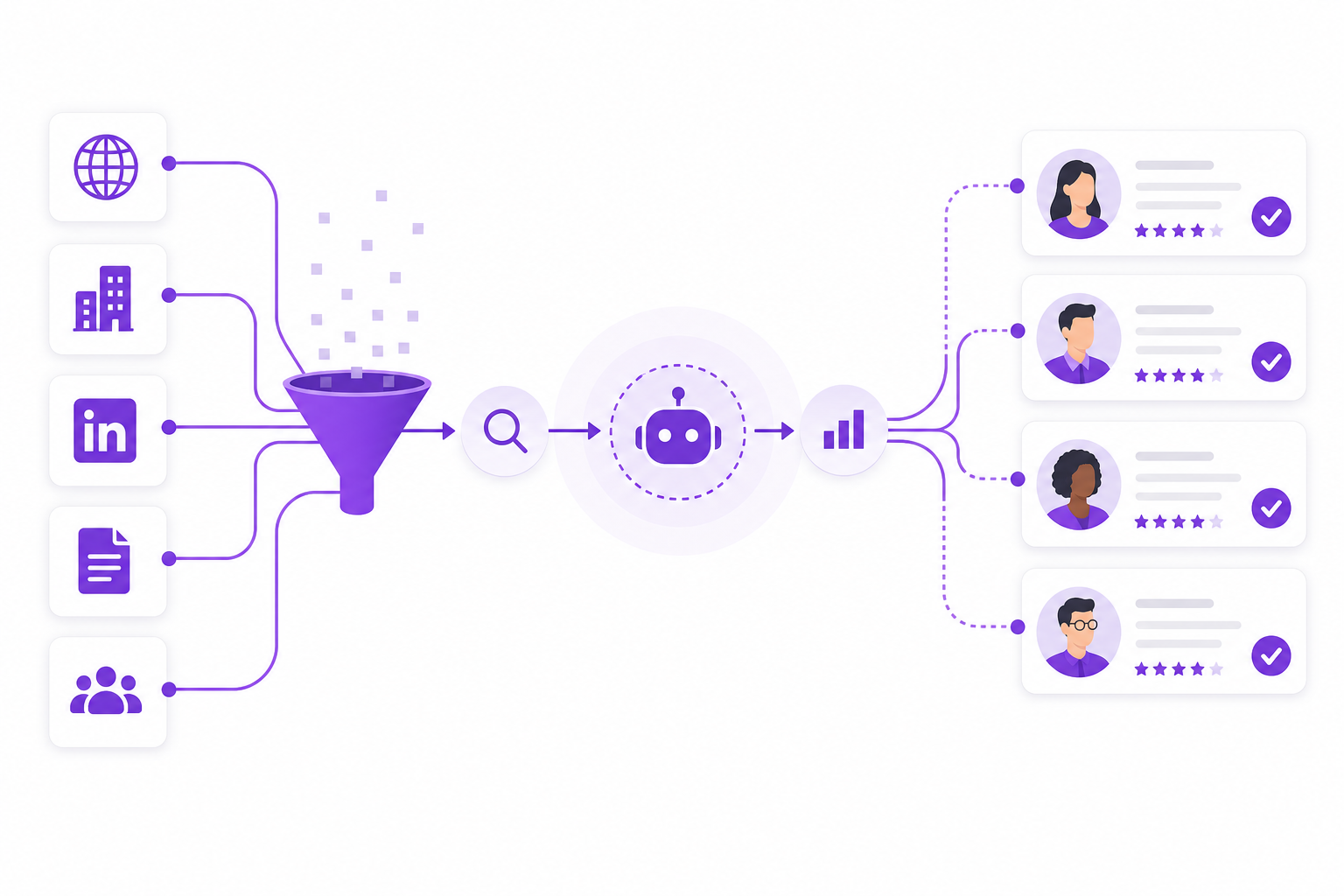
Lead research automation is the use of software, AI, and structured workflows to identify, qualify, and enrich B2B prospects without manual data entry at every step. Instead of a rep individually researching each company, automated systems:
- Discover companies matching your Ideal Customer Profile (ICP)
- Identify procurement, operations, and executive decision-makers
- Enrich company and contact profiles with firmographic data
- Verify email addresses and role relevance before outreach
- Score and prioritize leads by fit and buying signals
- Export qualified lists into your CRM or outreach platform
Automation handles volume and consistency. Your sales team handles strategy, messaging, and closing. Together, they create a prospecting engine that scales without proportionally increasing headcount.
Why Manual Lead Research Fails at Scale
Manual prospecting worked when target markets were small and buyer relationships were local. Modern B2B sales teams face different realities:
- Fragmented data — company info lives across LinkedIn, websites, directories, and trade databases
- Stale contacts — purchased lists decay quickly; roles change, emails bounce
- Inconsistent qualification — each rep applies different criteria, producing uneven pipeline quality
- Time drain — reps spend 30–40% of their week on research instead of selling
- Scaling limits — entering new industries or geographies multiplies research effort linearly
Teams that automate research reclaim selling time and produce more consistent, verifiable prospect lists. Compare approaches in our AI vs manual prospecting guide.
What to Automate First: A Priority Framework
Not every research task should be automated on day one. Prioritize high-volume, low-judgment work first:
1. Company Discovery
AI platforms scan business databases, web signals, and industry data to find companies matching your ICP—by industry, size, geography, and product relevance. This is the highest-impact automation for most teams.
2. Decision-Maker Identification
Finding the right contact—not just any contact—determines outreach success. Automate title-based discovery for roles like VP Sales, Procurement Manager, Operations Director, and CEO. Read how AI finds B2B decision-makers for a deep dive.
3. Contact Verification
Never automate outreach before verifying contacts. Automated verification checks email deliverability, role accuracy, and company association. See how to verify B2B leads before outreach.
4. Lead Scoring and Prioritization
Score prospects on ICP fit, company size, industry relevance, and engagement signals. Reps should spend time on A-tier leads, not sorting through hundreds of unqualified names.
5. CRM Data Entry
Automate the transfer of qualified prospects into your CRM with standardized fields, tags, and ownership assignment. Eliminate copy-paste errors and incomplete records.
Building a Lead Research Automation Workflow
A repeatable workflow turns tools into a system. Here is a proven seven-step process for B2B sales teams:
- Define your ICP — industry, company size, geography, buyer type, and disqualifiers
- Configure discovery rules — set filters in your AI prospecting or sales intelligence platform
- Run automated company discovery — generate an initial prospect list matching ICP criteria
- Enrich and identify decision-makers — add contacts for relevant roles at each company
- Verify contacts — validate emails and role relevance before any outreach
- Score and segment — rank prospects A/B/C and tag by industry or territory
- Export to CRM and outreach — hand off qualified lists to reps or sequences
Document this workflow so new reps and managers can repeat it consistently. Pair it with the lead research checklist for quality control at each stage.
Lead Research Automation vs Sales Intelligence
These terms overlap but serve different functions:
| Capability | Lead Research Automation | Sales Intelligence |
|---|---|---|
| Primary goal | Build qualified prospect lists faster | Provide context for selling and prioritization |
| Key outputs | Verified contacts, scored lists, CRM records | Company insights, intent signals, competitive data |
| Best for | SDRs and reps doing outbound prospecting | AEs preparing for calls and account planning |
| Typical tools | AI prospecting platforms, enrichment APIs | Intent platforms, news alerts, firmographic databases |
Most high-performing teams use both. Automation builds the list; intelligence informs the conversation. Explore sales intelligence tools for 2026 and best prospect databases for B2B sales.
Choosing the Right Automation Stack
Your stack depends on team size, target market, and sales motion. Evaluate platforms on:
- ICP matching accuracy — does it find companies that actually fit your buyer profile?
- Decision-maker coverage — are contacts role-specific and current?
- Verification built in — or does it require a separate tool?
- Industry flexibility — manufacturing, SaaS, professional services, export?
- CRM integration — one-click export or manual CSV uploads?
- Scalability — can you add markets without linear cost increases?
Compare platforms in AI sales prospecting tools compared before committing to a annual contract.
Common Lead Research Automation Mistakes
- Automating outreach before verifying contact quality
- Skipping ICP definition—automation amplifies bad targeting
- Treating automation output as final without human review
- Measuring list volume instead of meeting conversion
- Using generic databases when ICP-specific discovery is available
- Failing to update ICP criteria based on win/loss data
- Not connecting automation tools to CRM and outreach workflows
Automation magnifies whatever strategy you feed it. Weak ICP plus fast automation equals more bad leads, faster.
Measuring Automation ROI
Track these metrics monthly to confirm automation is improving outcomes—not just activity:
- Research hours saved per rep — before vs after automation
- Qualified prospects added per week — volume with quality bar
- Contact verification rate — percentage of emails that pass validation
- Reply rate on automated lists — compared to manual research lists
- Meetings booked per 100 prospects — ultimate efficiency metric
- Cost per qualified lead — tool cost divided by verified, ICP-matched contacts
- Pipeline velocity — time from prospect identified to first meeting
If reply rates drop after automation, the problem is usually list quality or messaging—not the automation itself. Revisit verification and ICP filters before blaming the tool.
Lead Research Automation by Sales Role
SDRs and BDRs
Automate company discovery, contact enrichment, and list building. Reps focus on personalization and multi-touch sequences rather than hours of LinkedIn scrolling.
Account Executives
Use automation for account expansion—finding additional stakeholders at existing accounts and identifying lookalike companies in adjacent segments.
Sales Managers
Standardize research quality across the team. Automation ensures every rep works from similarly qualified lists rather than individual research habits.
RevOps and Sales Ops
Integrate automation into CRM hygiene, lead routing rules, and territory assignment. Clean data in means clean pipeline reporting out.
Getting Started: 30-Day Implementation Plan
- Week 1: Document current research process and time spent per rep
- Week 2: Define or refine ICP; select one automation platform to pilot
- Week 3: Run first automated list; verify contacts; compare quality to manual lists
- Week 4: Integrate with CRM; train team; set KPI baselines for month two
Start with one segment or territory. Prove conversion before rolling automation across the entire sales organization. Use the B2B sales automation guide to connect research automation with outreach and pipeline workflows.
Frequently Asked Questions
What is lead research automation?
Lead research automation uses AI and software to discover B2B companies, identify decision-makers, verify contacts, score prospects, and export qualified lists into your CRM—replacing hours of manual LinkedIn and database research.
Does lead research automation replace sales reps?
No. Automation handles repetitive data gathering and list building. Reps still own messaging, relationship building, objection handling, and closing. Automation gives them more time to sell and better data to sell with.
How accurate is automated lead research?
Accuracy depends on the platform and your ICP definition. Top AI prospecting tools deliver 85–95% contact accuracy when combined with verification steps. Always verify before outreach—automated discovery plus human validation produces the best results.
What should I automate first in lead research?
Start with company discovery and decision-maker identification—the highest-volume, lowest-judgment tasks. Add contact verification and CRM sync next. Save outreach personalization for human reps or AI-assisted drafting tools.
How long does it take to implement lead research automation?
Most B2B teams run a productive pilot within two to four weeks: define ICP, configure one platform, generate and verify a test list, and compare results to manual research. Full team rollout typically takes one to two months including CRM integration and training.
How Adsaga.ai Automates Lead Research
Adsaga.ai is built to eliminate manual prospecting for B2B sales teams—from ICP-matched company discovery through verified decision-maker identification and lead scoring.
With Adsaga.ai, sales teams can:
- Discover companies matching your ICP by industry, size, and geography
- Find verified procurement, operations, and executive decision-makers
- Build scored prospect lists ready for CRM import and outreach
- Reduce research time from hours per lead to minutes per list
- Scale prospecting across new markets without adding researchers
- Improve outreach reply rates with better-targeted, verified contacts
Pair Adsaga.ai with your existing CRM and email tools to complete the research-to-revenue workflow. Try Adsaga.ai and see how fast qualified prospect lists can be built.
Final Thoughts
Lead research automation is no longer a luxury for enterprise sales teams—it is a competitive requirement for any B2B organization that wants predictable pipeline without burning reps on spreadsheet work. The teams winning in 2026 automate discovery, verification, and scoring while keeping humans in control of strategy and relationships.
Start with a clear ICP, automate the repetitive steps, verify every contact, and measure meetings booked—not emails sent. Whether you sell SaaS, industrial equipment, or professional services, the principle is the same: let software find the prospects so your team can focus on winning them.
Ready to stop manual prospecting? Get started with Adsaga.ai or explore more B2B sales guides on the Adsaga blog.